-
Get Started
-
Patient
-
Appointment
-
Communication
-
Offerings
-
Staff details
-
Reports
-
Settings
-
Tools
-
Troubleshooter
-
Privacy Policy
-
Billing
The Australian Immunisation Register (AIR) is a national register administered by Medicare Australia that records details of vaccinations given to children under seven years of age who live in Australia. It was established in 1996 in response to a decline in childhood immunisation in Australia and an increase in preventable childhood diseases.
Children under seven years of age and enrolled in Medicare are automatically included on the AIR. Children not eligible to enroll in Medicare can be added to the AIR when vaccination details are received from a doctor or immunisation provider.
Health professionals use the AIR to monitor immunisation coverage levels and service delivery and to identify regions at risk during disease outbreaks. AIR data also: Enables immunisation providers and parents/guardians to check on the immunisation status of an individual child, regardless of where the child was immunised.
Forms the basis of an optional Immunisation History Statement, which informs parents and guardians of their child’s recorded immunisation history. Provides information about a child’s immunisation status to help determine eligibility for the Australian Government’s Child Care Benefit and Maternity Immunisation Allowance payments.
Provides a measure of coverage at a national, State/Territory, and local level. It provides information for the delivery of incentive payments and feedback reports to eligible immunisation providers.
AIR Claiming:
To access AIR Claiming, your Practice must complete specific steps.
- Register for an individual PRODA account to access AIR.
- If your Practice does not already have an AIR provider number, you will need to apply for one at Apply for an AIR provider number.
To record a natural immunity:
- Select practice location from the drop-down menu
- Then select the disease from the drop-down menu
- Enter the notification date
- Then select the laboratory testing date or the physician-based clinical diagnosis date
- Select Add to record a natural immunity.
A message will let you know the natural immunity has been recorded.
Select your relevant provider number from the drop-down menu if you work at two or more locations. If you work at 1 location, the AIR will automatically record the medical contraindication against it.
You can only record a natural immunity for one disease at a time. You must repeat this process for every disease you record a natural immunity for.
To record their encounter:
- Select Record Encounter.
- Select Who performed this immunisation Encounter. If the encounter was performed overseas, select the Country of Immunisation.
- Enter the Date of Service. If you’re recording the encounter for a child, select the appropriate schedule.
- Enter the episode details, including the Vaccine/Brand, Batch Number and Serial Number. Some vaccines, including Astra Zeneca and Pfizer, have a lot number instead of a batch number. Enter the lot number when there is no batch number. If you don’t know the batch or serial number, enter ‘notrecorded’ (no spaces).
- Select Add to record the encounter.
Children aged 5-11 are now eligible to receive some COVID-19 vaccines. They should be recorded using the same vaccine code as the adult dose.
Note: Fields marked with an asterisk indicate that they are mandatory information.
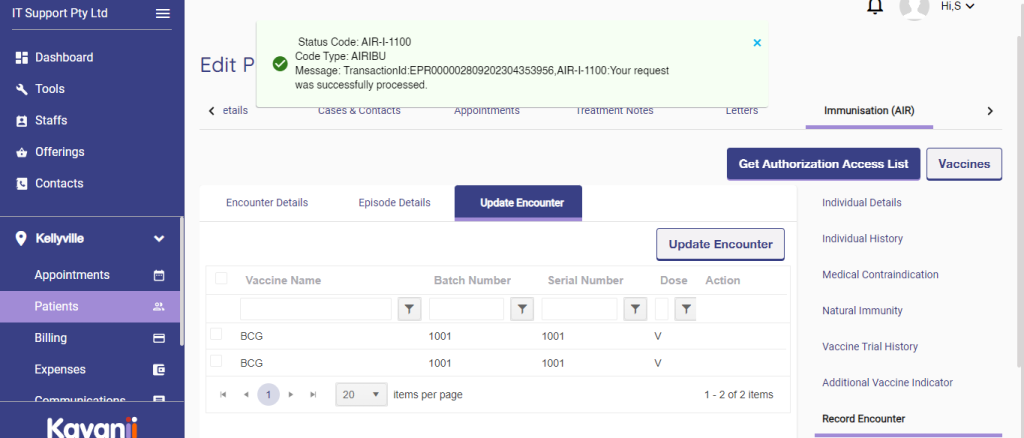
You’ll get a success message if the encounter is recorded correctly.
You can only select Update Encounter if you submitted the original encounter and have not been paid. If the encounter was administered by someone else or you’ve been paid for it, we can update the details for you. You’ll need to send us the details through secure email.
To update an encounter:
- Open the encounter you want to change by selecting the pencil icon under the Action column
- And update the relevant details on the Edit Encounter screen. When you’ve made your edits, select Submit.
A message will display to let you know the encounter has been updated.
View our education module to get help updating an encounter.

Click on Vaccine to add Vaccine and UTA description details.

Fill in the Vaccine brand name and disease details, then click add.
Please fill in the Vaccine name, Vaccine code, brand name and disease it is used for and click on save.
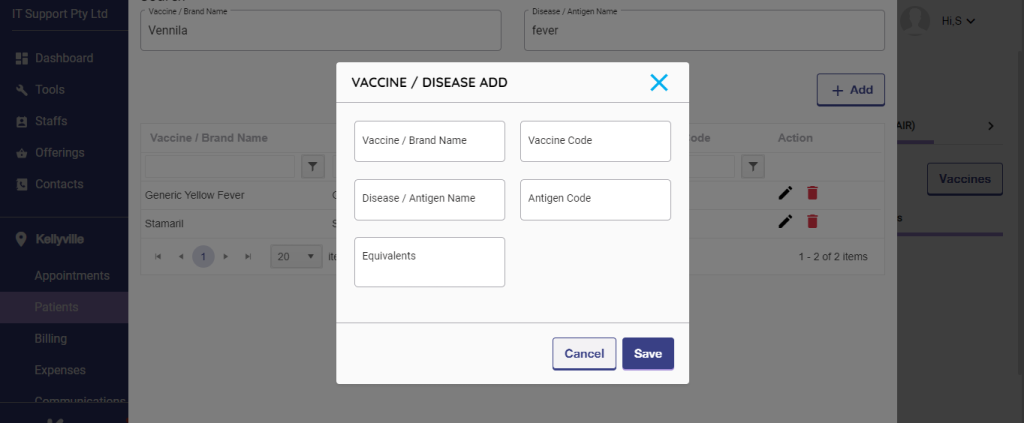
It will be saved and will be displayed on the Vaccine list.
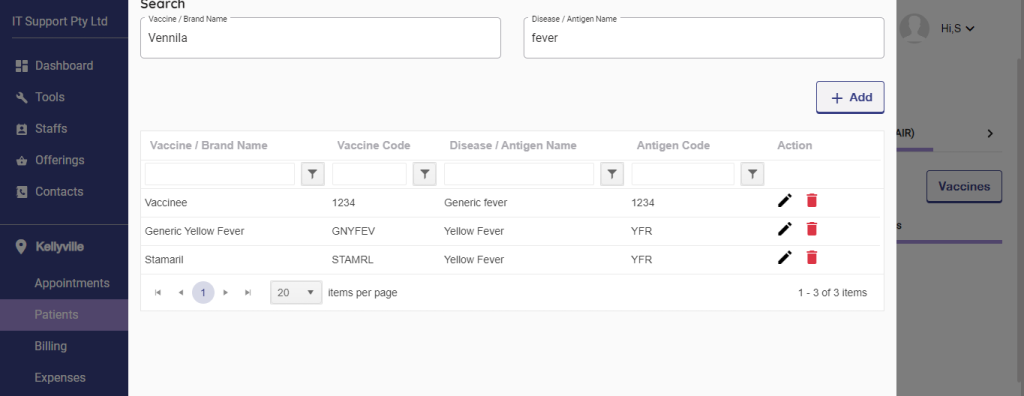
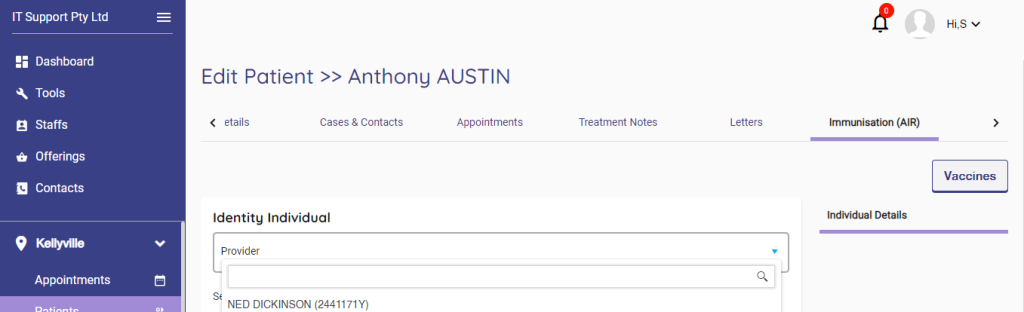
Once the Vaccine is saved on the list, please go ahead with the Vaccine scheduled details. First, choose an identity provider.
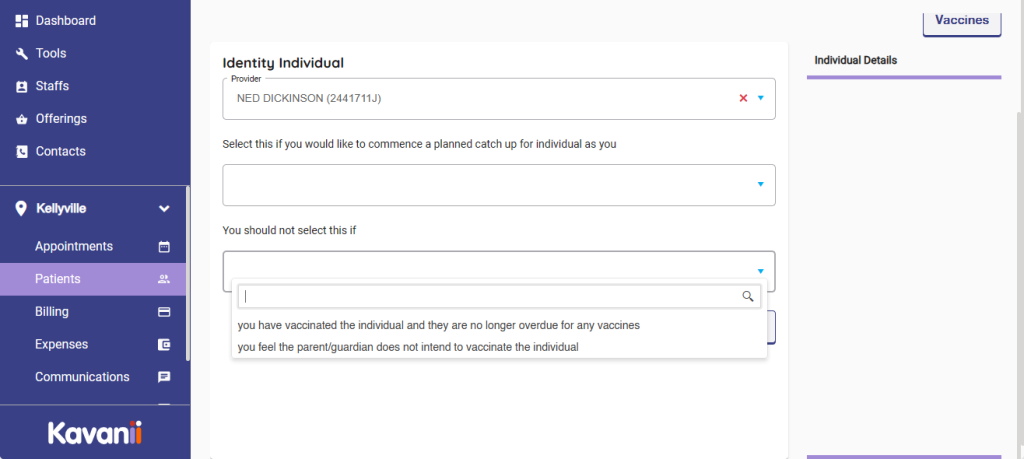
Please select the second option. If the Vaccine has been scheduled later, choose the appropriate option for later scheduling.

Please choose the third appropriate option if the Vaccine has been done.
Please choose an option to select search.
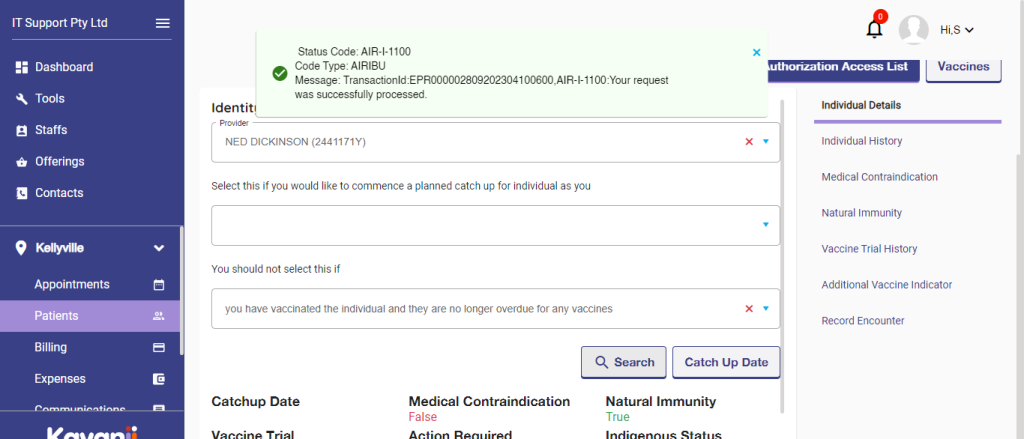
Once done, Please select the Authorisation list:

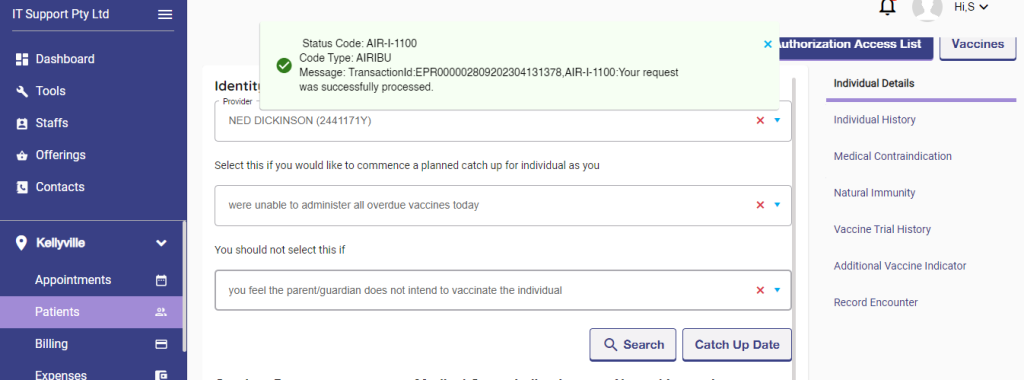
Please choose an option for individual history. To see the complete.

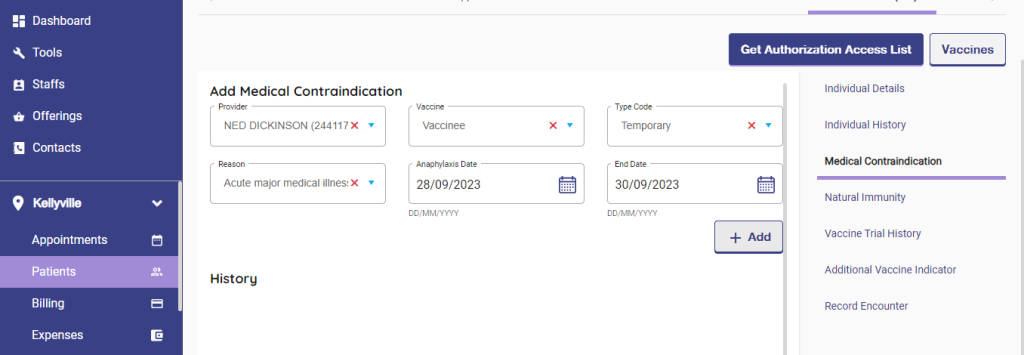
Please click on medical contradiction to add any contradiction for patients.
Natural Immunity: Select Natural immunity and fill up the details, click on save to get it displayed on the list.

Vaccine Trial History: Please choose this to fill out if any trial has been done or is yet to be done.
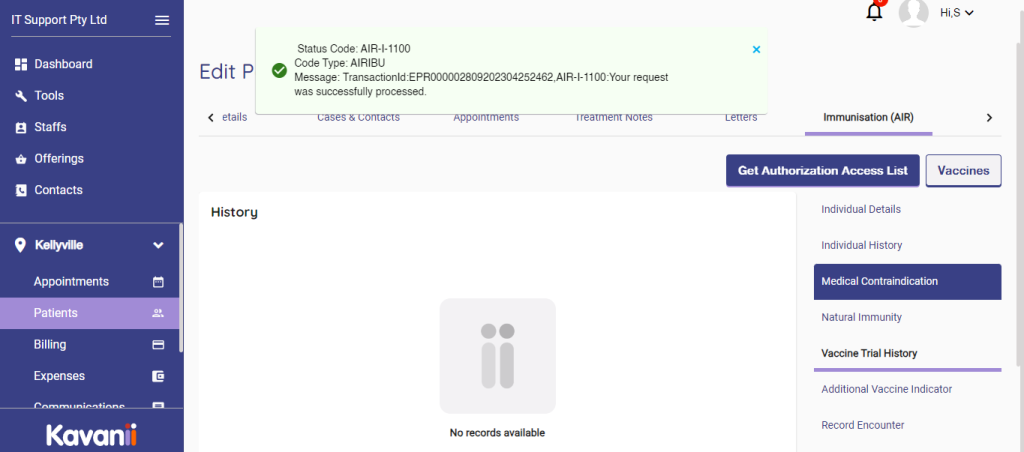
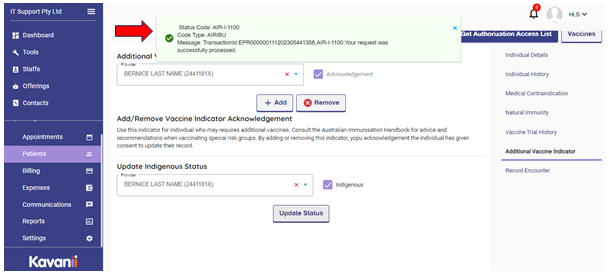
Additional Vaccine Indicator: Please choose this option to add if any vaccine indicator should be done. Select Practitioner, click Add, and a status update will be displayed.
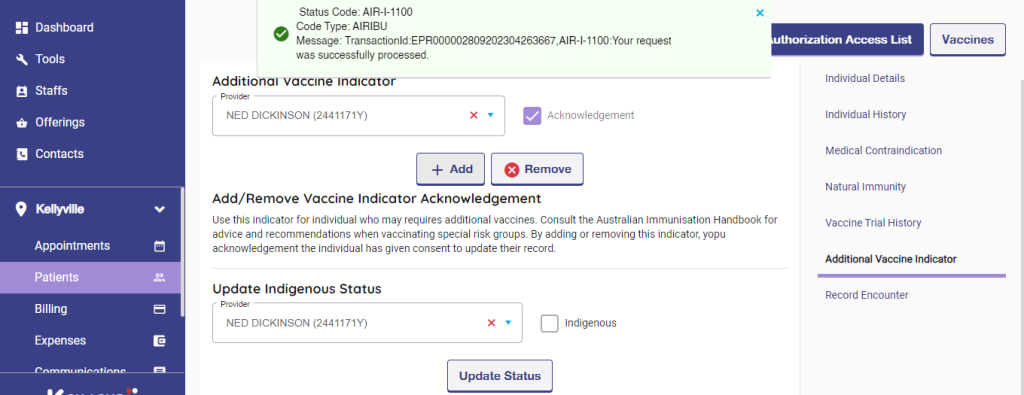
Then, choose Update Indigenous status, select Practitioner and click on Update status.

Record Encounter: Please choose this option for history records and choose Encounter details:
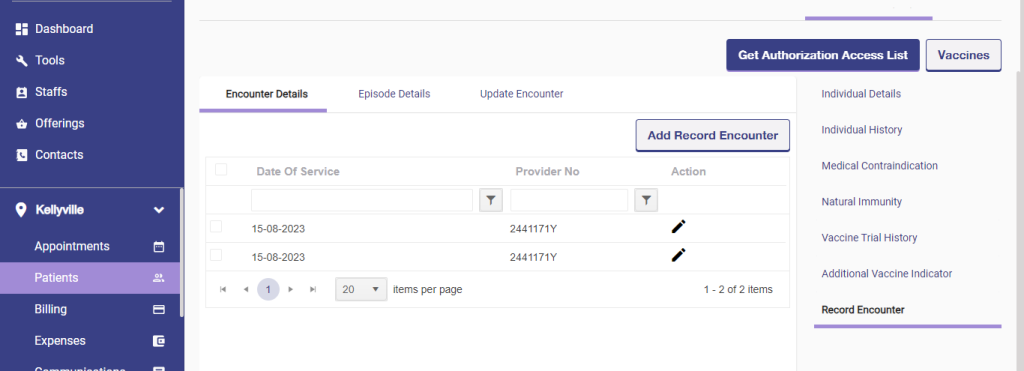
Record Encounter → Episode details: Please choose this option for previous history of vaccines done:

Click on Add Episodes:
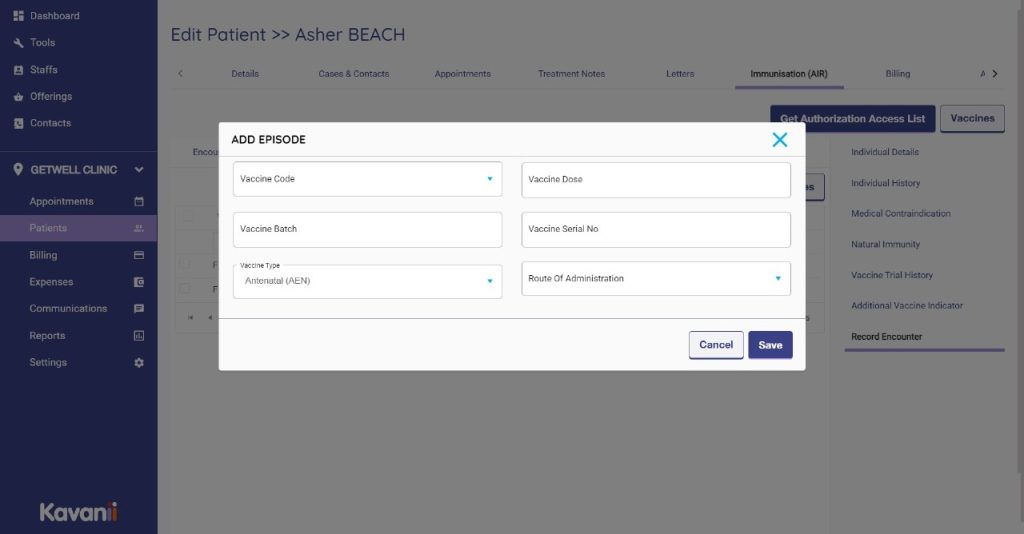
And click on save to add this to the list.
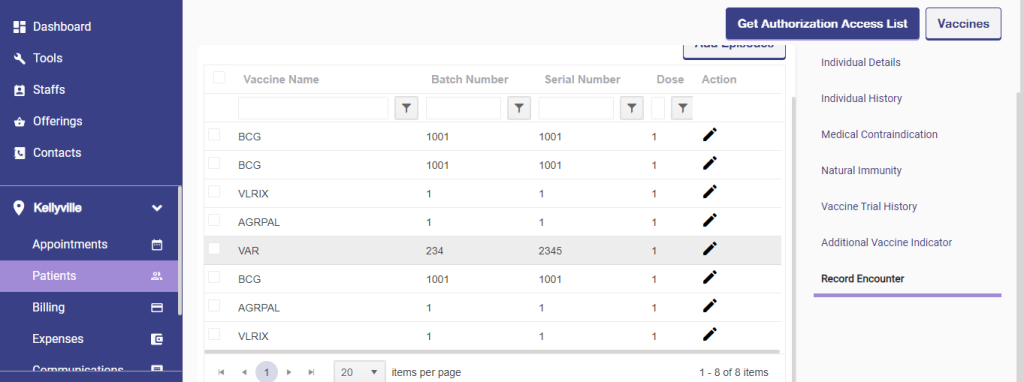
Update Encounter:
Please update the status of the vaccine encounter and click on add more to the list.
The AIR:
The Australian Immunisation Register (AIR) is a national register that records vaccines given to people of all ages in Australia. You can request an immunisation history statement for your child. Services Australia maintains the immunisation register.
From 30 September 2016, the Australian Childhood Immunisation Register (ACIR) expanded to become the Australian Immunisation Register (AIR), a national register that records immunisations given to people of all ages in Australia.
AIR Immunisation History Statements are automatically generated when an individual completes their early childhood immunisation schedule.
Immunisations can be recorded on the AIR by your immunisation provider. This includes immunisations in the National Immunisation Program (refer to the adult immunisation schedule) and those that are privately funded.
To access air:
Individuals: How to access to AIR as a medical practitioner, midwife, nurse practitioner, or a delegate. Organisations: How to access to AIR as a general practice, pharmacy, Residential Aged Care Facility, or an Authorised Nurse Immuniser with an ABN.
Providers can now only access the Australian Immunisation Register (AIR) through HPOS using a PRODA account. Authentication file log in to AIR was decommissioned in 2021.
Individuals: How to access to AIR as a medical practitioner, midwife, nurse practitioner, or a delegate.
Organisations: How to access to AIR as a general practice, pharmacy, Residential Aged Care Facility, or an Authorised Nurse Immuniser with an ABN.
Log into air
- Go to HPOS website: https://www.humanservices.gov.au/health-professionals/services/medicare/hpos.
- Select: Log on.
- Select: AIR log on only
To update the Australian immunisation register
Ask your doctor or vaccination provider to update your record. If you get vaccinated while overseas, get a copy of the details and ask your GP or vaccination service provider to add it to the AIR. Find out more about the AIR on the Services Australia website.
Immunisation encounters, medical exemptions and immunisations given by another provider, including those performed overseas, can all be recorded directly on to the AIR site and the individual’s record will be updated immediately.
Need for the Australian immunisation register
personal information: Medicare number (if applicable), name, contact details, date of birth, gender. vaccine information: brand name, dose number and batch number, date given, for COVID19 vaccines – vial serial number (if known) provider information: provider number, name and contact details.
Australia's immunisation strategy:
Its aim is to prevent disease and severe outcomes of disease by maximising immunisation coverage in people of all ages. The strategy comprises eight strategic priority areas to complement and strengthen the NIP: • Improve immunisation coverage. Ensure effective governance of the National Immunisation Program.
Remember
- The Australian Immunisation Register (AIR) can record immunisations given to people of all ages in Australia.
- When enrolling or re-enrolling your child in child care, kindergarten, primary or secondary school, you need to provide a current AIR Immunisation History Statement.
- Please ensure Medicare has the correct details (including address) for you and your children.
- To request an AIR Immunisation History Statement contact the Services Australia .
- Maternity Immunisation Allowance was replaced by new requirements for Family Tax Benefit Part A in 2012.
- Mandatory reporting to AIR commenced in 2021.
- It may be of assistance to your end users to include links to their mandatory reporting obligations https://www.health.gov.au/topics/immunisation/immunisationinformation-for-health-professionals/using-the-australian-immunisation-register#mandatory-reporting
- It may be of assistance to your end users to include a link to the Australian Immunisation Handbook https://immunisationhandbook.health.gov.au
For more information, please Visit the Services Australia .
Please open the website, click on patient option and choose a patient:

Once patient information opened, click on immunization:
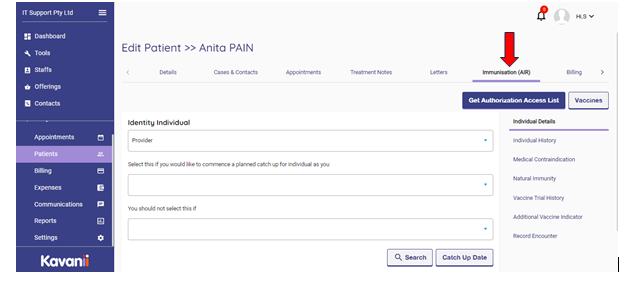
Under immunization we can go for multiple options: the first one will be individual details:
Please choose the provider’s name:
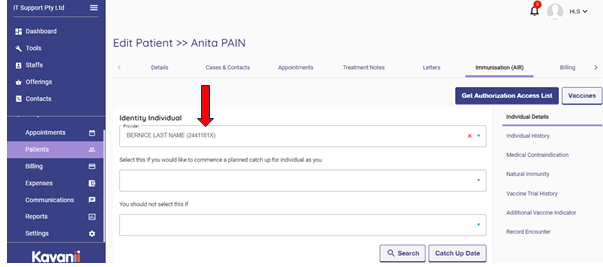
Once after the provider name, we can choose Get Authorization Access List – which will provide the information about the provider authorization on immunization:
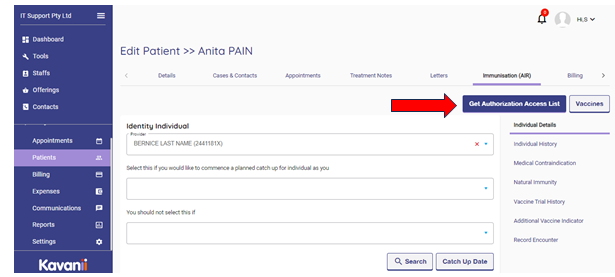
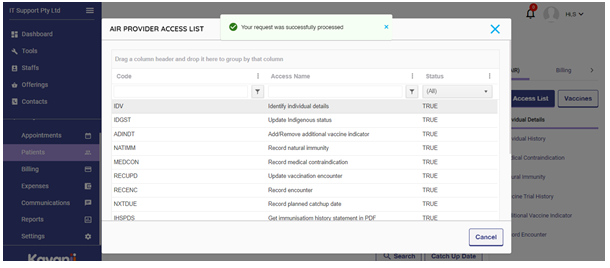
Then click on Vaccines option: to view the list of vaccines
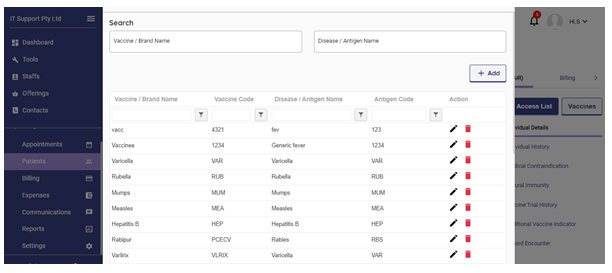
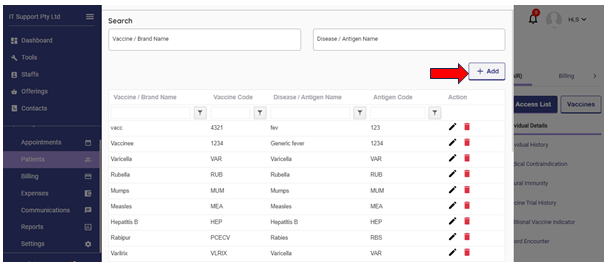
We can click on +Add button to add new vaccine to the list:
Once access details checked, click on Search option at bottom:
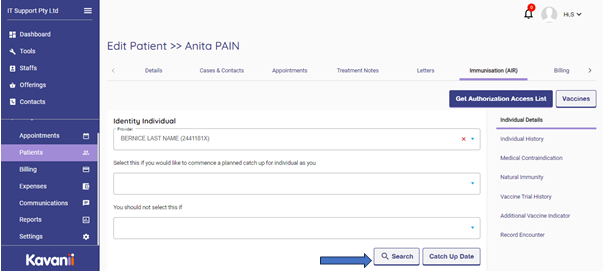
The details will be displayed below for search: Next catch up date , immunity details, medical contradictions if any.
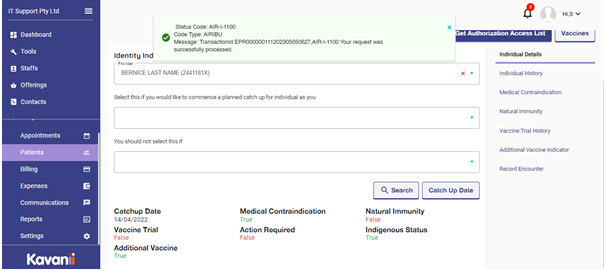
Once after the details obtained, now click on Catch Up Date for next vaccine term due date:
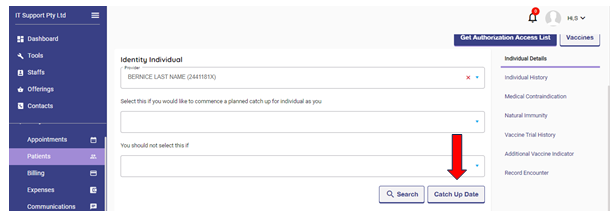
If any vaccines are on due will be displayed, if there is no vaccine on due no list will be displayed. Shows an error message no vaccine on due.
Please choose for Individual history option, to view list of vaccines which are provided already.
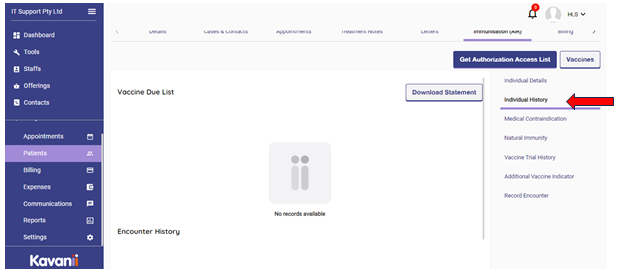
If any vaccines provided already will be listed on this page, we can even download the statement by clicking on download statement:

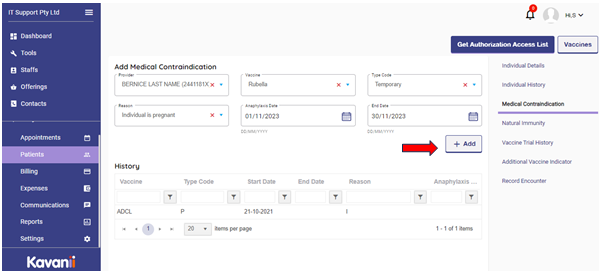
Next we need to select Medical contradictions: If any medical contradiction is there for patients previously, we can add the details here:

For this patient there is already a contradiction added, now if we need to add one we can fill up all the details and choose +Add button:
Next we need to choose Natural immunity option: to update immunity details:
To record a natural immunity:
- select practice location from the drop down menu
- then select the disease from the drop down menu
- enter the notification date
- then select the laboratory testing date or the physician based clinical diagnosis date
- select Add to record a natural immunity.
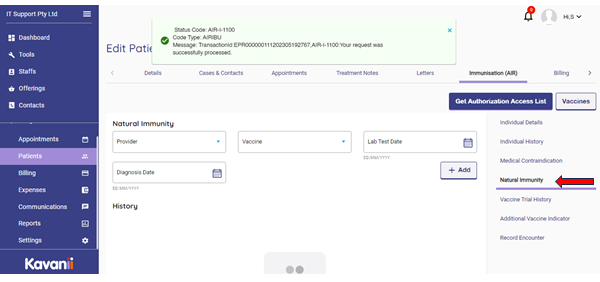
Fill up all the details and click on +Add to add the details to Immunity history:

Vaccine trial history option: Any Vaccine trial made to patient will be updated on this page. The trial vaccine will be applied for the patients to check if this medicine is allergic or the patient body accepts it without any complications. Not all vaccines will be under trial, some specific vaccine will be under this list.
Vaccine trial is a type of immunisation exemption on the AIR. To prevent vaccine trial participants from being disadvantaged, the AIR is required to exclude vaccine trial participants, from the National due and overdue rules assessment for Family Assistance (Family Tax Benefit and Child Care Subsidy) purposes, during the duration of a vaccine trial period.
The exclusion will only be implemented for individuals participating in a vaccine trial that has been approved by a Department of Health and only for the duration of the trial period. These individuals will be considered ‘fully immunised’ for the antigen which they are a vaccine trial participant.
The AIR Individual Vaccine Trial History API is a retrieve Web Service which will process the request and send a response message in real-time.

For this patient no vaccine trial has been done previously hence no details updated here.
Additional vaccine indicator: The Additional Vaccines Required Indicator enables vaccination providers to add an indicator for an individual who may require further follow up. Individuals may require additional vaccines as per the Australian Immunisation Handbook for special risk groups.
For example, if they are:
- Indigenous
- Managing a chronic health condition
- A low birth weight
- Preterm babies
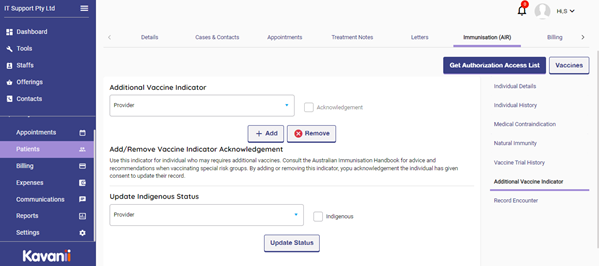
Please select the provider name and details and check the box near acknowledgement and click on add to add the details:
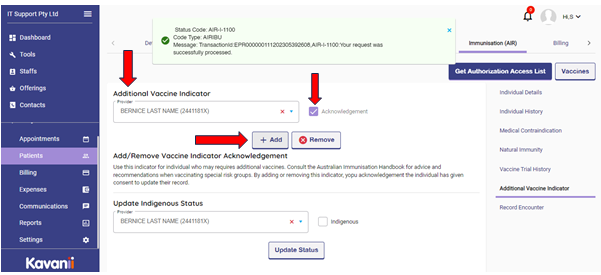
Also update the patient’s indigenous details , please click on the check box if indigenous or not and click on update status:
To identify Indigenous people who may require additional vaccines, vaccination providers can record Indigenous status directly on the AIR and it will not be over-ridden by their status recorded by Medicare. AIR Indigenous status will not be recorded on any other government database and it does not need to be the same as Medicare.
Recording an Indigenous status on the AIR helps vaccination providers to identify and give the clinically correct vaccination schedule. Vaccination providers should seek consent from the person at the time of a vaccination encounter before recording their Indigenous status on the AIR.
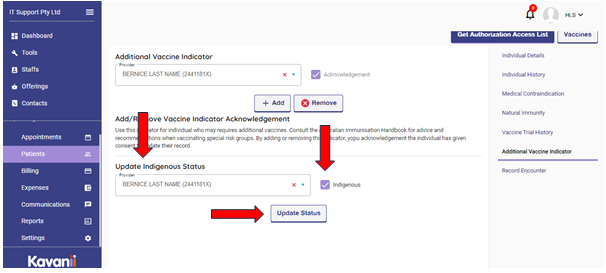
And a message will be display that the details updated:
Next we need to go for Record encounter details:
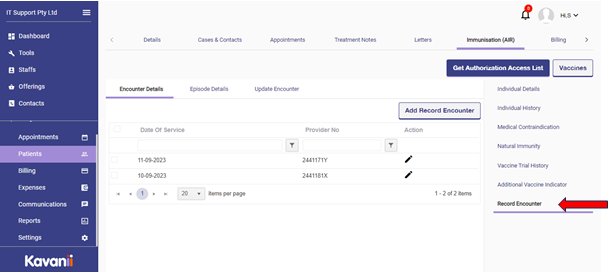
Under this we have encounter details, episode details and update encounter details.
Encounter details: To add vaccine encounter details:
To record their encounter:
- Select Record Encounter.
- Select Who performed this immunisation Encounter. If the encounter was performed overseas, you need to select the Country of immunisation.
- Enter the Date of Service. If you’re recording the encounter for a child, select the appropriate schedule.
- Enter the episode details including the Vaccine/Brand, Batch Number and Serial Number. Some vaccines, including Astra Zeneca and Pfizer, have a lot number instead of a batch number. Enter the lot number when there is no batch number. If you don’t know the batch or serial number, enter ‘notrecorded’ (no spaces).
- Select Add to record the encounter.
Children aged 5-11 are now eligible to receive some COVID-19 vaccines. They should be recorded using the same vaccine code as the adult dose.
Note: fields marked with an asterisk indicate that they are mandatory information.
You’ll get a success message if the encounter was recorded correctly.

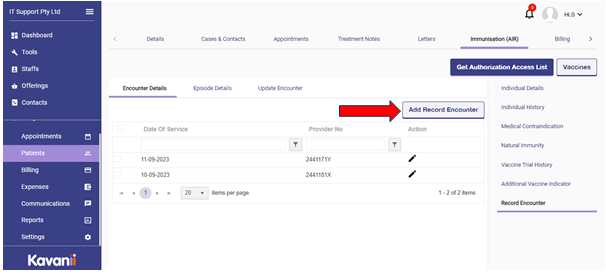
Previously vaccine encounter details will be on the list, to add new we can click on Add Record Encounter button:
Episode details:
An immunization given to the individual by the vaccination provider. Each encounter will have at least one episode and may have up to five episodes.
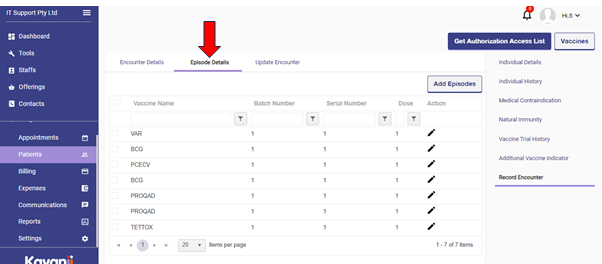
- We can add encounter episodes by clicking on Add Episodes button:
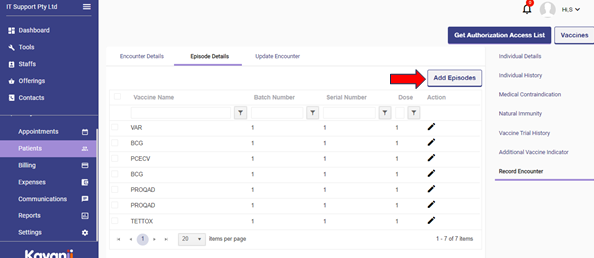
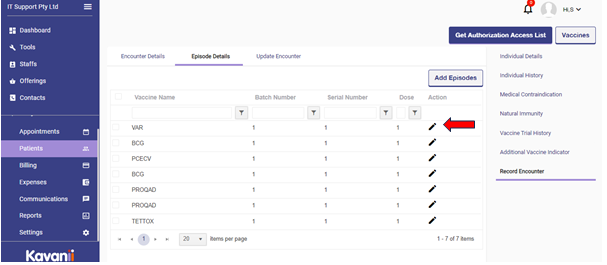
We can edit previous episode information by clicking on pencil icon at the end of vaccine name:
Update encounter: enables vaccination providers to update vaccines they have previously submitted to the AIR. Vaccination providers are not able to update vaccines submitted by other vaccination providers or if a vaccine has attracted an AIR information payment for completing a schedule.
When using this service, it is a requirement that all episodes within the original encounter retrieved from the AIR Individual Immunisation History Details API response, must be included in the subsequent Update Encounter request (regardless of the editable status).
You can only select Update Encounter if you submitted the original encounter and haven’t been paid for the encounter. If the encounter was administered by someone else, or you’ve been paid for it, we can update the details for you. You’ll need to send us the details through secure email.
To update an encounter:
Click on Update encounter button on right corner:
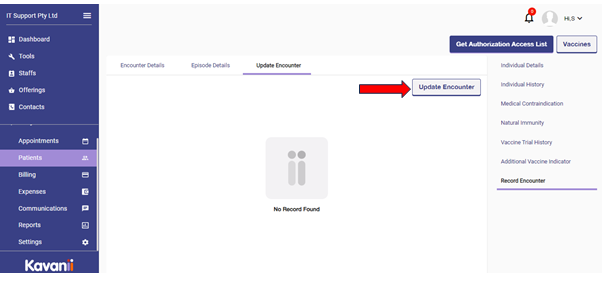
Kindly fill up the details and click on save to save the data on encounter details.
We will not be able to administer all vaccines at a single day, please select below scenario:
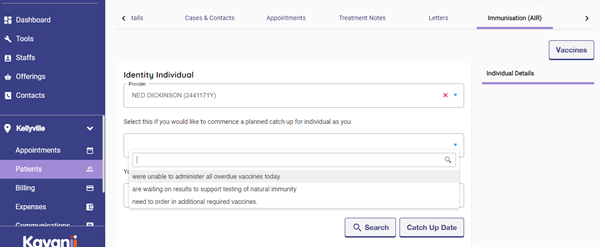
When waiting for an result of natural immunity to dose up a vaccine, select below scenario:

Waiting scenario when additional vaccine needs to be ordered,
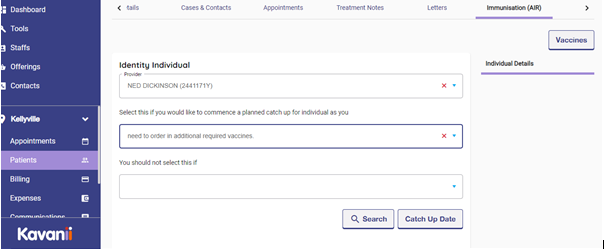
We should not select any if we are not having any vaccinated scheduler:
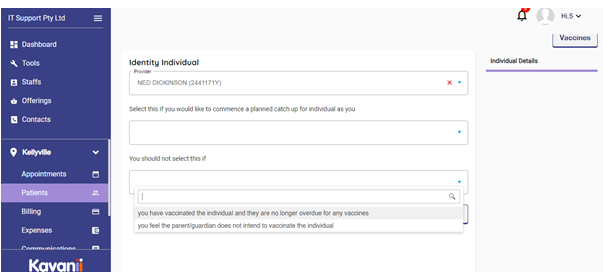
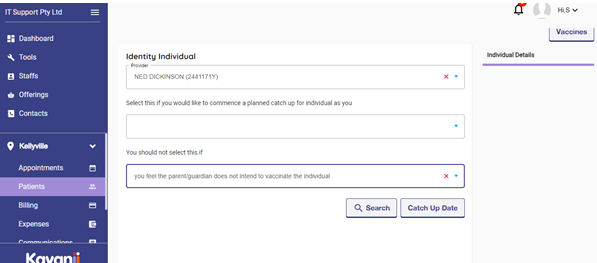
Please choose the option below if, any parent or guardian of the individual is restricting for vaccination:
Please do not hesitate to contact Kavanii support for any issue that pertains or anything else that might concern you:
Email to support@kavanii.com.au